 NameSense
Start with a built-in rule
Use a rule as it is, or adjust and save your own version. App updates do not overwrite saved rules.
Content Title
Uses AISuggests a short title from the file content.
Document Type
Uses AIDocument type followed by a short title.
Image Description
Uses AIA short description of the image. Needs a vision model.
Paper Title
Uses AIPublication year and original title. Omits a missing year.
Add Date
Runs locallyCreation date followed by the original filename.
Choose the parts you need
Combine parts for the information you want. The app keeps file extensions, so you do not need an extension part.
- Local parts: original filename, fixed text, counters and dates. No AI needed.
- Metadata parts: PDF title, author, image dimensions and more, depending on what the file contains.
- AI parts: titles, descriptions and categories, using your configured provider and a suitable model.
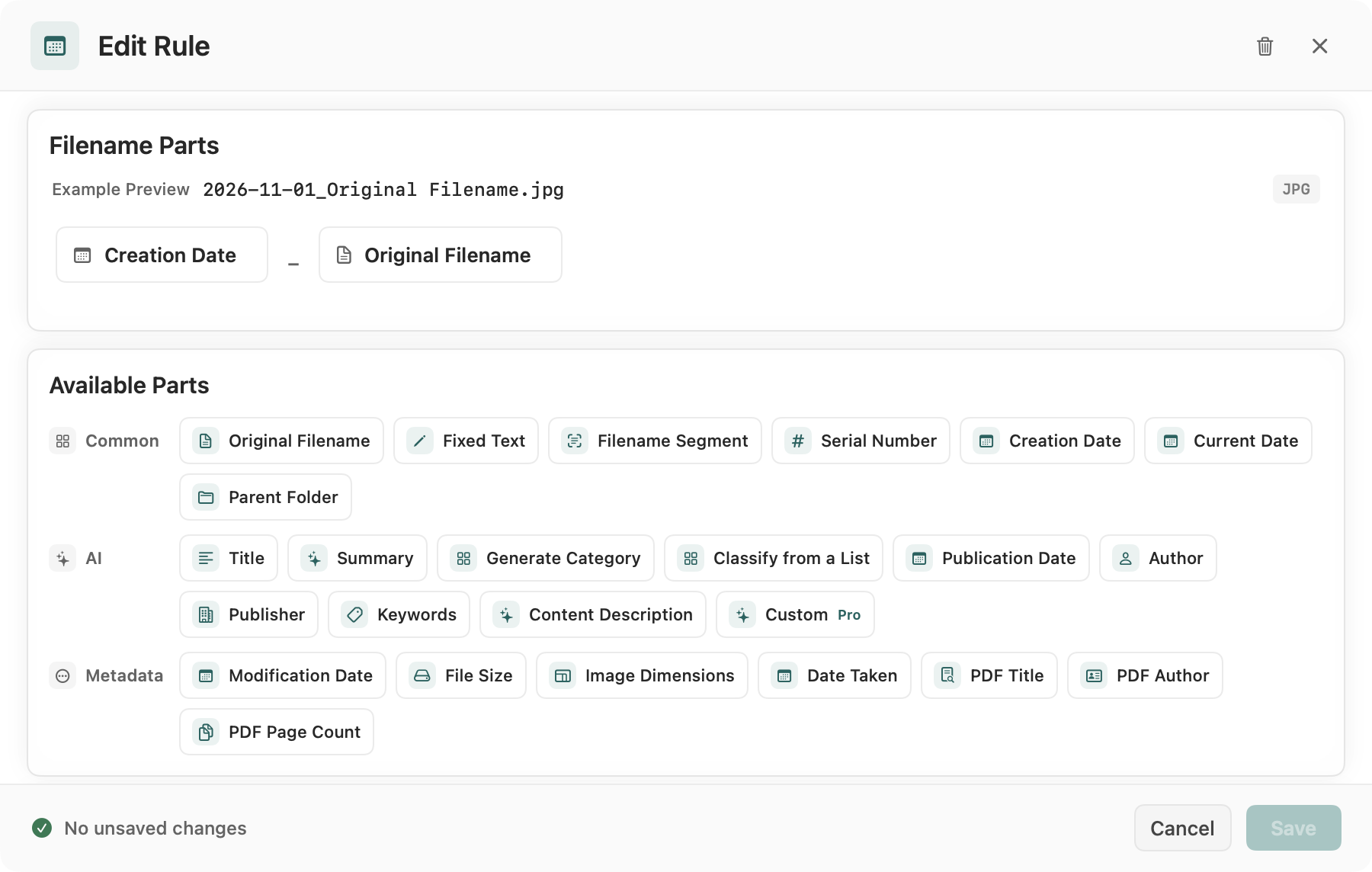
Arrange parts and try an example
Set the part order, formats and separator. These two local examples need no AI.
Example: number project files
- Practice input
- Download notes.txt or prepare a few practice text files. Check their batch order first. Download practice file
- Rule settings
- Fixed Text set to Project, then Serial Number starting at 1 with three digits. Use - as the separator. The second item becomes Project-002.txt.
- Preview result
notes.txtProject-001.txt- Checks and recovery
- Numbering does not continue automatically across batches. Before adding to an existing folder, check its highest number and adjust the start or prefix to avoid conflicts.
Practice files contain no personal information. Generating a preview does not change the files.
Example: creation date and original filename
Choose Add Date: Creation Date formatted as yyyy-MM-dd, then Original Filename, separated by _. A notes.txt file created on 2026-09-08 becomes 2026-09-08_notes.txt. Use the file-system creation date on your Mac, not a document, photo capture or publication date.
Add AI when needed
Built-in AI fields generate titles, descriptions and categories. Generating with custom AI instructions, including imported rules containing them, requires Pro. Editing and saving remain available. Provider charges are separate.
Handle missing values and conflicts
Check a small batch first. An empty optional part is omitted; an empty required part can produce a missing-value marker. A configured fallback belongs to AI generation failure handling, not an automatic fallback from PDF metadata to page text. Review unresolved suggestions before applying.
Build and reuse one rule, step by step
Use project numbering to learn the editor; then change the information source only when your task needs it. The same rule can be reused, but its counter is not a persistent archive number.
- Create a rule and give it a recognizable name, such as Project files. Add Fixed Text and enter Project.
- Add Serial Number after the text; use numeric format, start at 1 and three digits. Set the rule separator to -. Do not add an extension part.
- Save the rule and generate suggestions for the three-file practice batch. Verify the order and every source-to-target pair before selecting and applying changes.
- For the next batch, reopen the saved rule and deliberately choose the starting number. If the destination already has Project-001.txt to Project-003.txt, start at 4 or choose another prefix.
Read the preview before renaming
These are review decisions, not promises that NameSense can repair missing information. Keep the source files until the result is checked.
Scroll sideways to see the full comparison →
| Preview issue | Meaning | Next step |
|---|---|---|
| An optional author disappears | The part returned no usable value; it is omitted. | Confirm the author is absent. Keep it optional or remove the part. |
| A missing-value marker appears | A required part has no result. Metadata parts do not automatically invoke AI. | Use Original Filename, change the rule, or deliberately choose AI after reviewing the text. |
| The AI request fails | A configured AI fallback may be substituted; it is not extracted evidence. | Check the provider/model and the issue shown in the app. Do not treat a fallback as a verified title. |
| The target name is already taken | A batch item or existing file uses that path. | Adjust a prefix, distinguishing part or counter start, then regenerate and review. |